Team communications

Phone, chat, and meetings, filed to the customer.

Swap the office phone system, the chat app, and the meeting tool for the login your contact center already uses. When your team calls, chats, or meets about a customer, it ends up on that customer's record.

100+ countries · Cloud, hybrid, or onsite · 1 to 1,000 seats

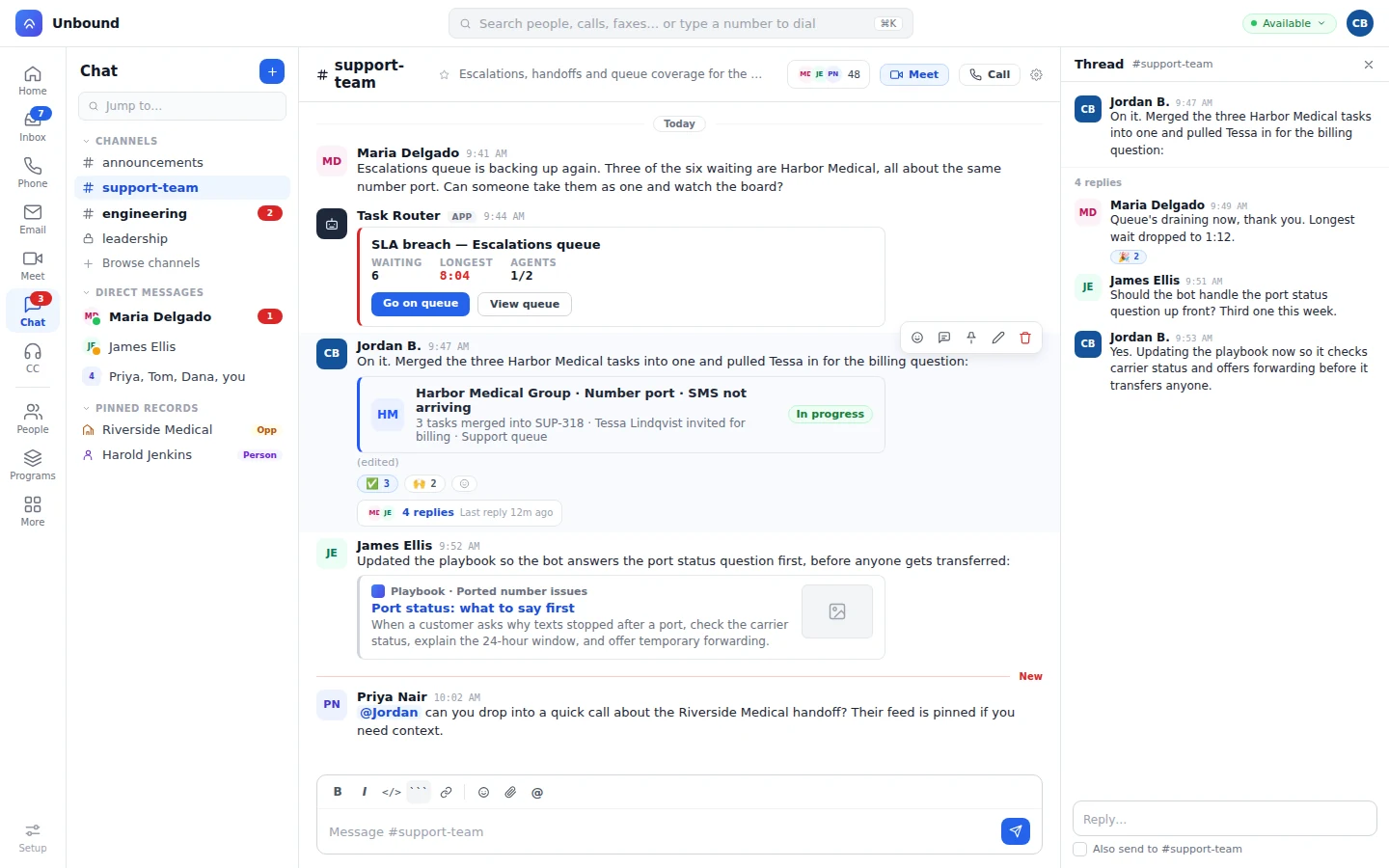
Team chat with customer records pinned beside the channels
Customer records pin right beside the channels, and a meeting or a call can start straight from the thread.
One system

Your team talks where your contact center and CRM already live.

That's also why the AI in your calls, chat, and meetings is useful. Ask it an HR or sales question in Unbound instead of pasting it into ChatGPT, and the answer comes back with the account, the history, and your policies already in it. No connectors to wire up, no second set of security settings, no extra license.

Before

  • The phone system keeps its own call log.
  • Threads about a customer scroll away in a separate chat app.
  • Meeting notes live in somebody's doc.
  • You message around to find out who's free.

On Unbound

  • Calls and their transcripts land on the customer's timeline.
  • Threads are pinned to the deal or ticket they're about.
  • A bot files the meeting summary on the customer.
  • Everyone sees one status, and an agent stuck on a call pulls in whoever's free.
Phone

The office number rings on the desk, the laptop, and the phone.

Desk phones, the desktop softphone, and the mobile app share the same line keys. Calls are transcribed and translated live, and any phone number on a record is a call button. An assistant who's delegated an executive's line sees it, screens or answers it with a warm handoff, and places calls that show the executive's number, from the web app or a desk phone.

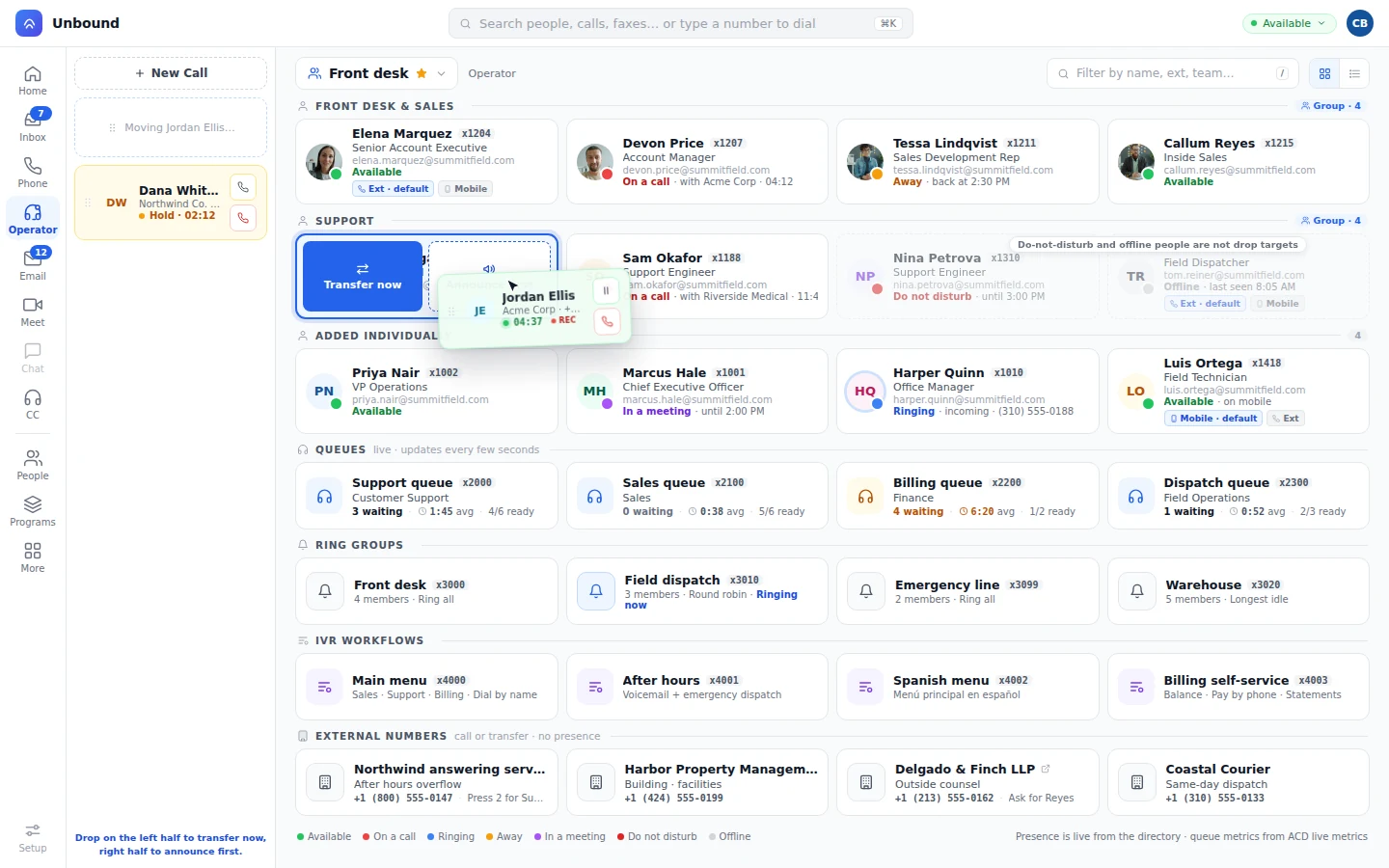
A call card dragged onto a tile in the Operator panel
A call drags onto the tile. It can announce to the person first or go straight through. Every tile shows who's free before you drop it there.
Every device

Click-to-call from any record.

Your rep dials from a person or an opportunity, at the desk or on their phone, and the call shows up on that record's timeline. A direct number routes around do-not-disturb and each person's own schedule.

Front desk

Drag a call onto a tile and it's transferred.

The Operator panel shows people, queues, ring groups, and outside numbers as tiles. Drag a live call onto one, warn them first or send it right over, and a one-click "are you available?" message checks before you do either.

Voicemail

Voicemail in the inbox.

Messages show up next to calls, texts, and faxes, and a copy goes to email.

Carrier

Keep your numbers.

Bring the numbers your customers already dial. HD voice and geo routing cover 100+ countries.

Chat

Pin the thread to the deal, and the customer comes with it.

Pin a channel, DM, or thread to the customer it's about, and whoever's reading can open the record right there. You decide which conversations the knowledge base learns from.

Chat in detail
A chat thread with a knowledge base article and a request for a quick call about a pinned customer
A knowledge base article gets linked right in the thread during a quick call about the customer whose feed is pinned.
Meet

The meeting ends. The summary's already on the customer thread.

Everyone gets a personal room that's always ready, plus scheduled meetings and join by link, with screen share, live transcription, and translation. When a customer meeting wraps up, a bot posts the summary to that customer's thread and files the notes.

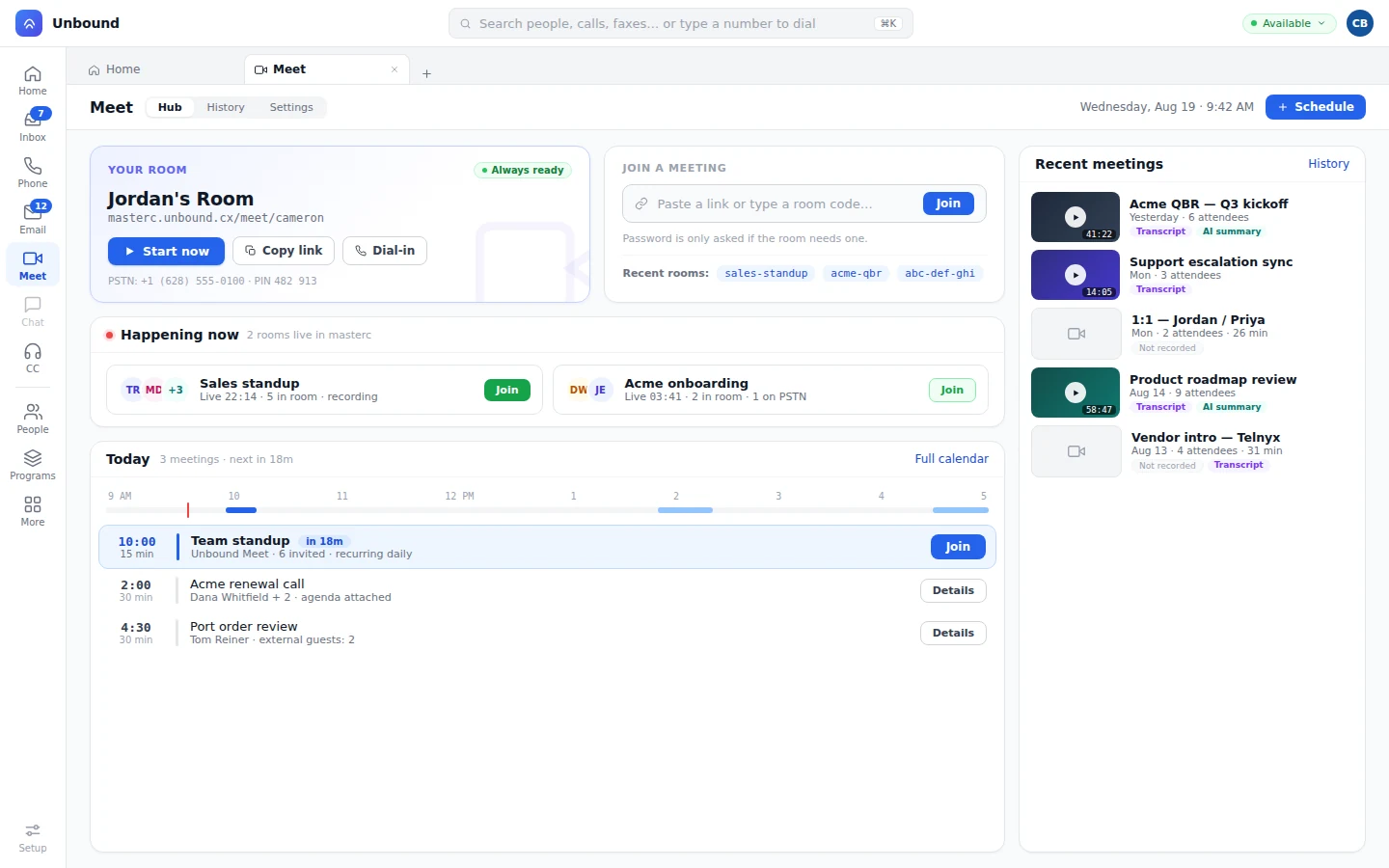
Meet hub with a personal room, live rooms, and recent meetings with transcripts and summaries
A personal room stays always ready, rooms live now show who's in them, and recent meetings come with a transcript and a summary.

Ask a question in a chat thread and a bot answers from the pinned customer, or brings in a teammate when it needs judgment.

Projects and portals

Run installs and onboarding on a board the customer can see.

Your team and your customer share the board, and you can look at it as a board, a table, or a Gantt. When an item moves, a workflow takes the next step.

  • Templates. Start each install or onboarding from the steps you always run.
  • Automation. A moved item can send the email, update the record, open the next item, or text, fax, or call.
  • Customer portals. Customers see where their requests stand, search your answers, and work their own items.
  • Partner portals. Partners register deals, your team approves them after a conflict check, and partners follow each one by stage.
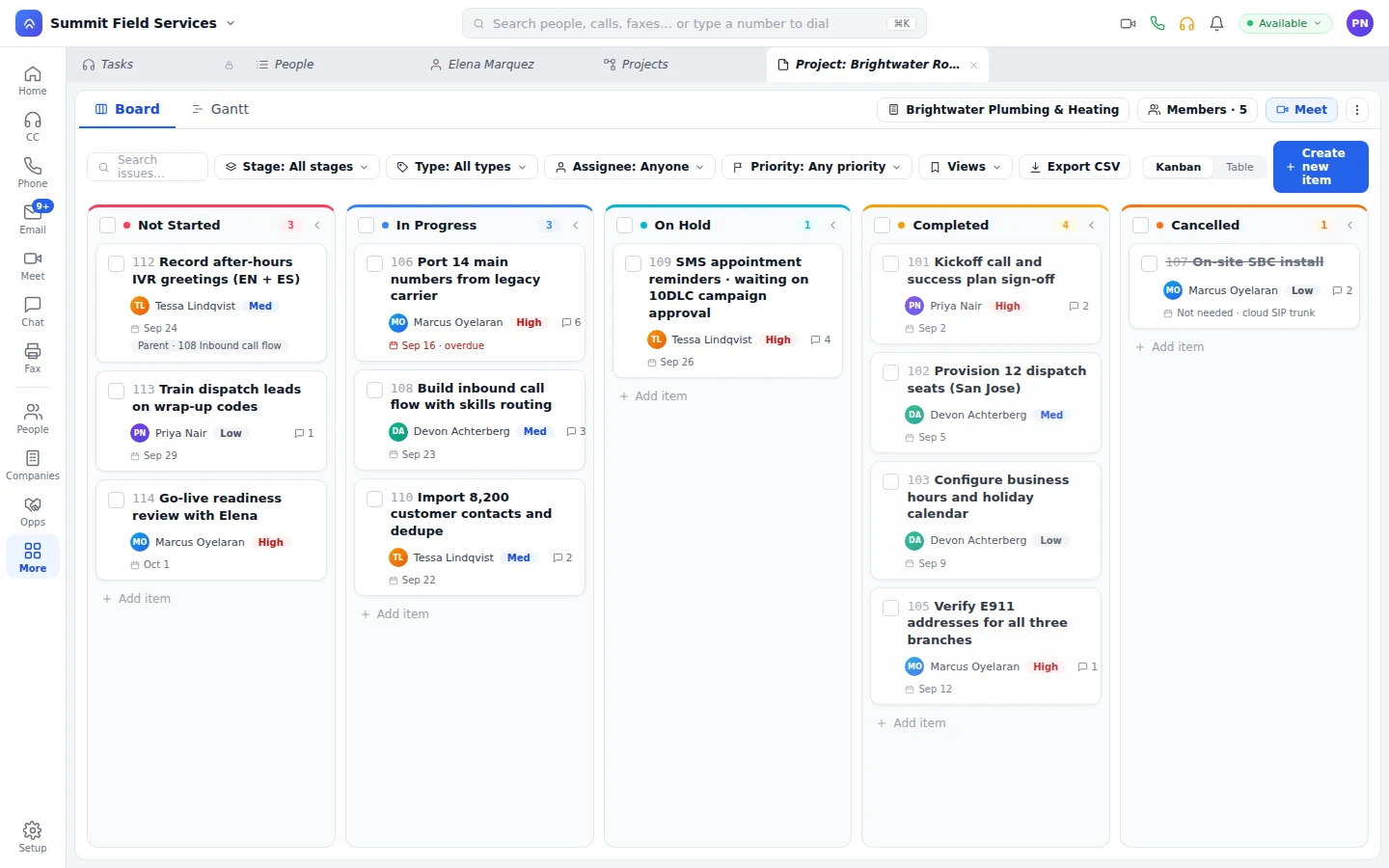
Project board with items by stage, owner, and priority
An item links to its parent, overdue work gets flagged right on the card, and every item shows its stage, owner, and priority.
Questions

What people ask before moving the office over.

Are these the same bots that work our contact center?

Yes. The bot answering in a chat thread is one of the bots on your queues. See how supervisors watch and score them.

Does Unbound replace our office phone system, chat app, and meeting tool?

Yes. Phone, chat, and Meet sit on the same login as your contact center and CRM, with one presence and one directory. Desk phones, the desktop softphone, and the mobile apps all ring the same number.

How is this different from giving the team ChatGPT?

ChatGPT starts from a blank page. The AI inside Unbound starts from your customers, your records, and your policies, because it runs where the work already happens. Nothing to connect, no second admin console, and nothing new to log into.

What does the knowledge base learn from?

Only the chats, meetings, and internal calls your security rules allow. Everything else stays out of it.

Can customers and partners join our projects?

Yes, from their customer or partner portal. They work their own items and can see how the rest is going.

Can an assistant answer and place calls for an executive?

Yes. An assistant who's delegated an executive's line sees it, screens or answers with a warm handoff when the executive wants in, and places calls that show the executive's number, from the web app or a desk phone.
Put the whole office on one login for thirty days.

Your account comes with sample data already loaded. Call a teammate from the directory, pin a deal to a channel, and start a meeting from it.

With your consent, we use cookies for analytics, personalization, and advertising. Read our privacy policy for details.